
Hunt Ransomware Before It Encrypts: The Three Tools 45+ Gangs Reach For
Six queries for MDE and Elastic that catch NetScan, Advanced IP Scanner, and Advanced Port Scanner pre-encryption.

In just the first five months of 2026, 4,113 organizations were hit by ransomware. The attackers were not caught at encryption because nothing fired earlier. The discovery phase is where the attack was cheap to stop.
Ransomware is a discovery problem before it’s an encryption problem. Every group has to map your network before they exfiltrate or encrypt. That mapping step is where the attack is cheap to stop, and 45+ groups do it with the same three tools.
You’ll get two things in this piece:
Six queries (KQL for MDE, ESQL for Elastic, across Process, Network, and File events) that hunt SoftPerfect NetScan, Advanced IP Scanner (AIPS), and Advanced Port Scanner (APS). Not Sigma ports. Consolidated multi-signal queries that survive rename, filename strip, and hash change in a single pass.
A second signal hiding inside the detection that most defenders miss. A hit on two of these three tools doesn’t just mean “scanner ran.” It proves an interactive attacker session. The query at the end of Section 4 turns that proof into a pivot.
Tested in lab against Sliver C2. Run it in the next hour. Triage today.
1. Why discovery tools are the cheapest win
After initial access, the attacker has to map your network before exfiltration and encryption. That mapping step uses the same handful of tools across 45+ groups. It is the chokepoint.
GitHub - BushidoUK/Ransomware-Tool-Matrix by @BushidoToken catalogs which tools each ransomware group uses. Three names dominate the discovery row.
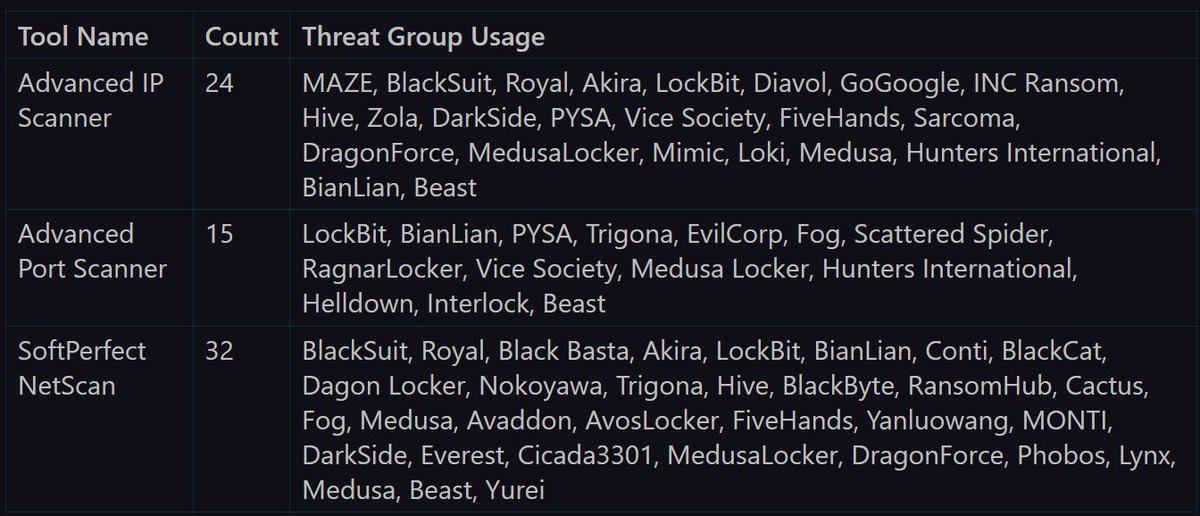
47 unique threat groups across three tools
Why these three? Signed by recognized vendors. Portable, no installer needed. GUI-driven and visually indistinguishable from sysadmin work at a glance. Speed and familiarity beat custom tradecraft.
Most existing detection rules match on filename. Rename advanced_ip_scanner.exe to chrome_update.exe and the rule breaks. That is the gap this query closes.
2. Shared telemetry signal across all three tools
Rename the binary. Strip the filename. Hash the file differently. Three checks defeated. The vendor metadata baked into the executable at compile time? Still there.
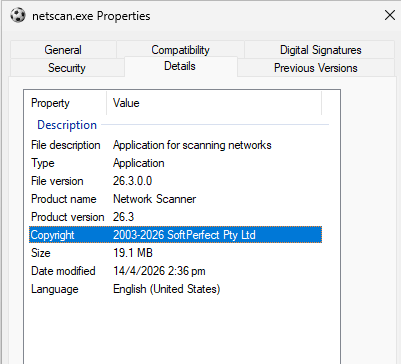
PE (Portable Executable) is the file format every Windows binary uses. The vendor stamps their company name, product name, and description into a header section at compile time. Renaming the file does not touch the version info.
Three signals layer on top of each other.
Signal 1: Vendor metadata (survives renames)
Famatech signs both Advanced IP Scanner and Advanced Port Scanner.
SoftPerfect signs NetScan.
One
ProcessVersionInfoCompanyNamecheck catches all three regardless of filename.
Lab evidence: rename advanced_ip_scanner.exe to HealthCheck.exe. Open file properties. CompanyName still reads Famatech. ProductName still reads Advanced IP Scanner. The rename is a one-second defeat against any filename rule. The metadata check holds.
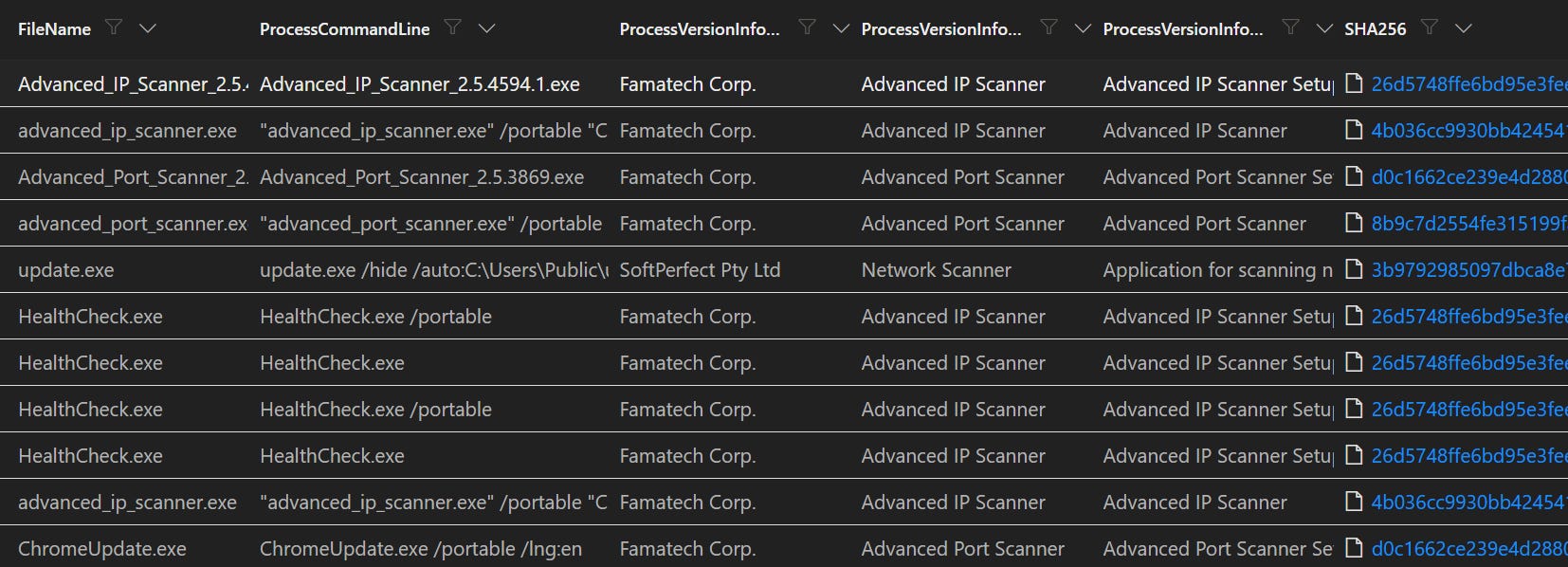
Signal 2: Command-line flag pairs (survives metadata strip)
/portable + /lngfor AIPS and APS. Portable mode skips the installer and runs from any path. The/lng(language) flag almost always travels with it./hide + /autofor NetScan. Headless execution that writes scan output to disk, no GUI required.
Example NetScan headless invocation seen in the wild:
n.exe /hide /auto:C:\Users\Public\scan_results.xml /range:192.168.72.1-192.168.72.254
/hideruns NetScan with no GUI./auto:<file>auto-runs the scan and writes XML output to that path./range:defines the subnet sweep range
Signal 3: Network sweep scan (survives everything)
One host hitting 50+ private IPs across 3+ ports inside 5 minutes is not normal user behavior. This signal catches the activity even if the binary is fully renamed and the metadata is stripped. Tool-agnostic.

3. The combined hunt query
These are not one-to-one Sigma ports. Three tools. One query for each event type.
Vendor metadata catches the renames.
Command-line flags catch the headless runs.
Network thresholds catch the sweep shape.
Folder paths catch the install artifacts.
Two SIEMs, copy-paste ready.
KQL (Microsoft Defender for Endpoint)
Process events
Catches: any of the three tools by vendor, product, description, or flag pair.
Tune: time window (default 30d). Otherwise leave alone.
let CompanyKeywords = dynamic(["Famatech", "SoftPerfect"]);
let ProductKeywords = dynamic(["Advanced IP Scanner", "Advanced Port Scanner", "Network Scanner"]);
let DescKeywords    = dynamic(["Advanced IP Scanner", "Advanced Port Scanner", "Application for scanning networks"]);
DeviceProcessEvents
| where Timestamp > ago(30d)
| where ProcessVersionInfoCompanyName has_any (CompanyKeywords)
    or ProcessVersionInfoProductName has_any (ProductKeywords)
    or ProcessVersionInfoFileDescription has_any (DescKeywords)
    or ProcessCommandLine has_all ("/portable", "/lng")
    or ProcessCommandLine has_all ("/hide", "/auto")
| project
    Timestamp, DeviceName, AccountName, FileName,
    ProcessCommandLine, ProcessVersionInfoCompanyName,
    ProcessVersionInfoProductName, ProcessVersionInfoFileDescription,
    SHA256, InitiatingProcessFileName,
    InitiatingProcessCommandLine, InitiatingProcessParentFileName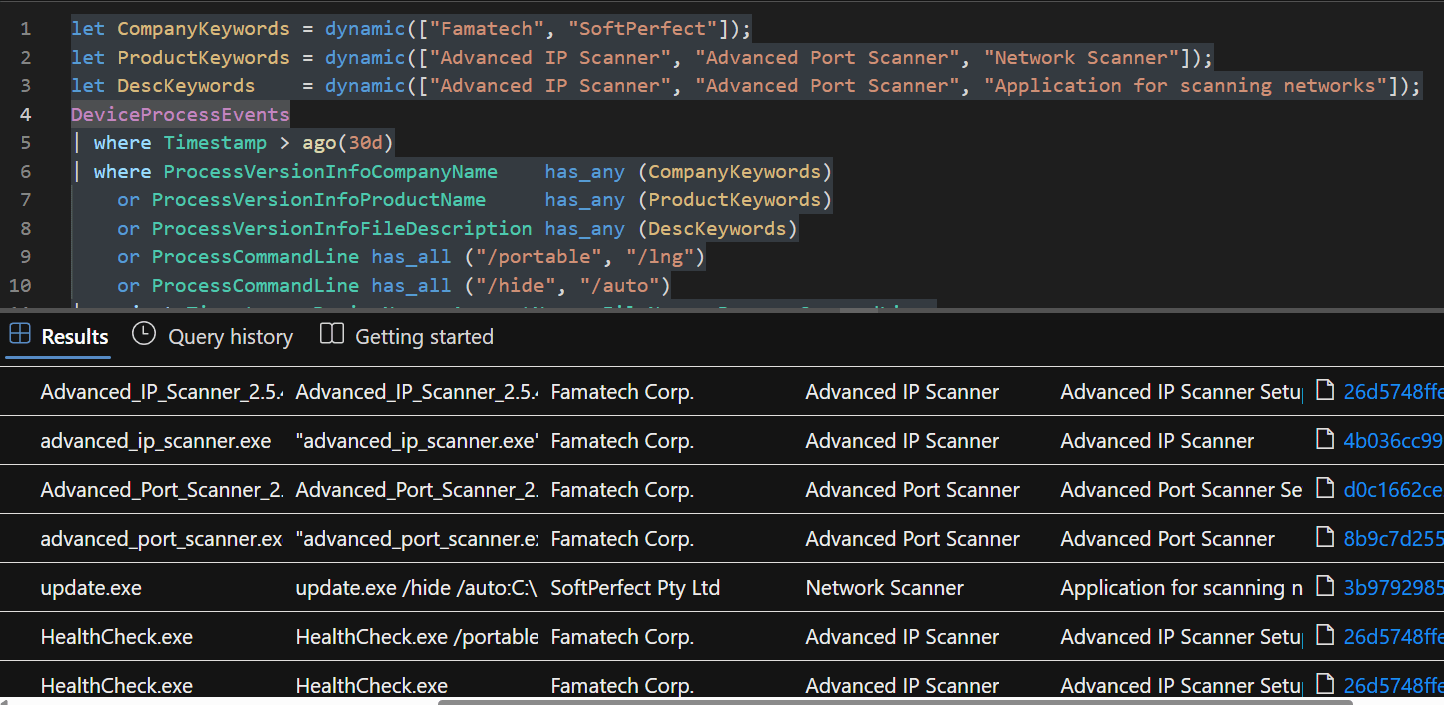
Network events
Catches: any process making rapid connections to many private IPs across multiple ports. Tool-agnostic, so it survives binary renames AND metadata stripping.
Tune:
ipThresholdandportThresholdfor your environment. Default 50 IPs / 3 ports per 5-minute bucket.
let startTime = datetime(2026-04-02T03:00:00);
let endTime   = datetime(2026-05-06T10:00:00);
let ipThreshold   = 50;
let portThreshold = 3;
let bucket = 5m;
DeviceNetworkEvents
| where Timestamp between (startTime .. endTime)
| where RemoteIPType == "Private"
| where ActionType startswith "Connection"
| summarize
    DistinctIPs   = dcount(RemoteIP),
    DistinctPorts = dcount(RemotePort),
    SampleIPs     = make_set(RemoteIP, 10),
    SamplePorts   = make_set(RemotePort, 10),
    FirstSeen     = min(Timestamp),
    LastSeen      = max(Timestamp)
    by DeviceName, InitiatingProcessFileName, InitiatingProcessSHA256, bin(Timestamp, bucket)
| where DistinctIPs >= ipThreshold and DistinctPorts >= portThreshold
| sort by DistinctIPs desc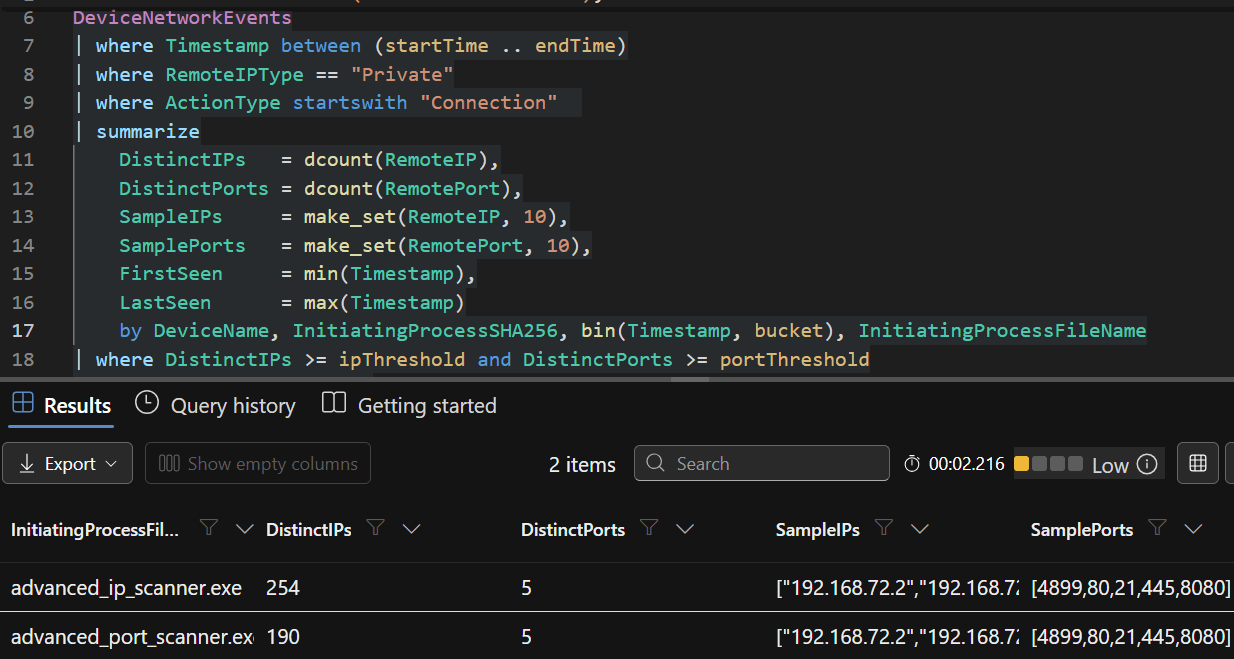
File events
Catches: AIPS and APS install artifacts in their default folders. NetScan is already covered by the process query.
Tune: folder path patterns if attackers stage to non-default locations.
DeviceFileEvents
| where Timestamp > ago(30d)
| where ActionType in ("FileCreated", "FileModified", "FileRenamed")
| where FolderPath has_any (@"\Advanced IP Scanner 2", @"\Advanced Port Scanner 2")
| summarize FilesDropped = make_set(FileName, 20), FileCount = dcount(FileName), FirstDrop = min(Timestamp)
    by DeviceName, InitiatingProcessAccountName, InitiatingProcessFileName,
       InitiatingProcessCommandLine, InitiatingProcessParentFileName
| order by FirstDrop asc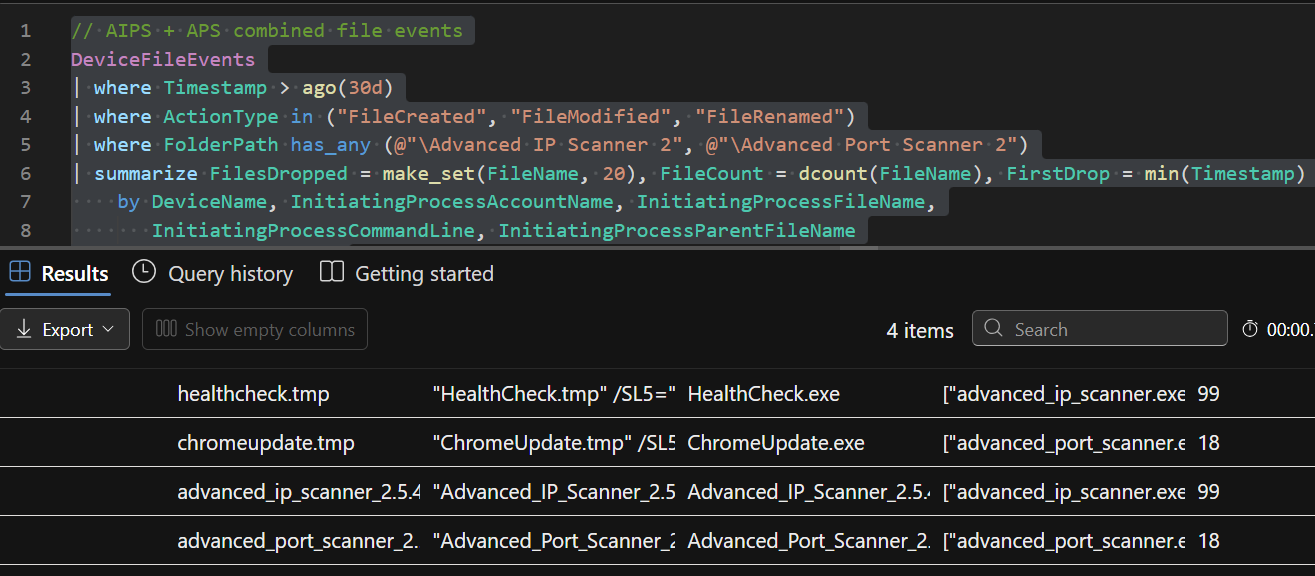
ESQL (Elastic)
Same logic, Elastic field names.
Process events
Catches: same surface as the KQL process query.
Tune: time window.
FROM logs-windows.sysmon_operational-default
| WHERE @timestamp > NOW() - 30 days
  AND event.code == "1"
| EVAL cmd_l = TO_LOWER(process.command_line)
| WHERE process.pe.company     RLIKE ".*(Famatech|SoftPerfect).*"
     OR process.pe.product     RLIKE ".*(Advanced IP Scanner|Advanced Port Scanner|Network Scanner).*"
     OR process.pe.description RLIKE ".*(Advanced IP Scanner|Advanced Port Scanner|Application for scanning networks).*"
     OR (cmd_l LIKE "*/portable*" AND cmd_l LIKE "*/lng*")
     OR (cmd_l LIKE "*/hide*"     AND cmd_l LIKE "*/auto*")
| KEEP @timestamp, host.name, user.name, process.name, process.command_line,
       process.pe.company, process.pe.product, process.pe.description,
       process.hash.sha256, process.parent.name, process.parent.command_line
| SORT @timestamp ASC
| LIMIT 1000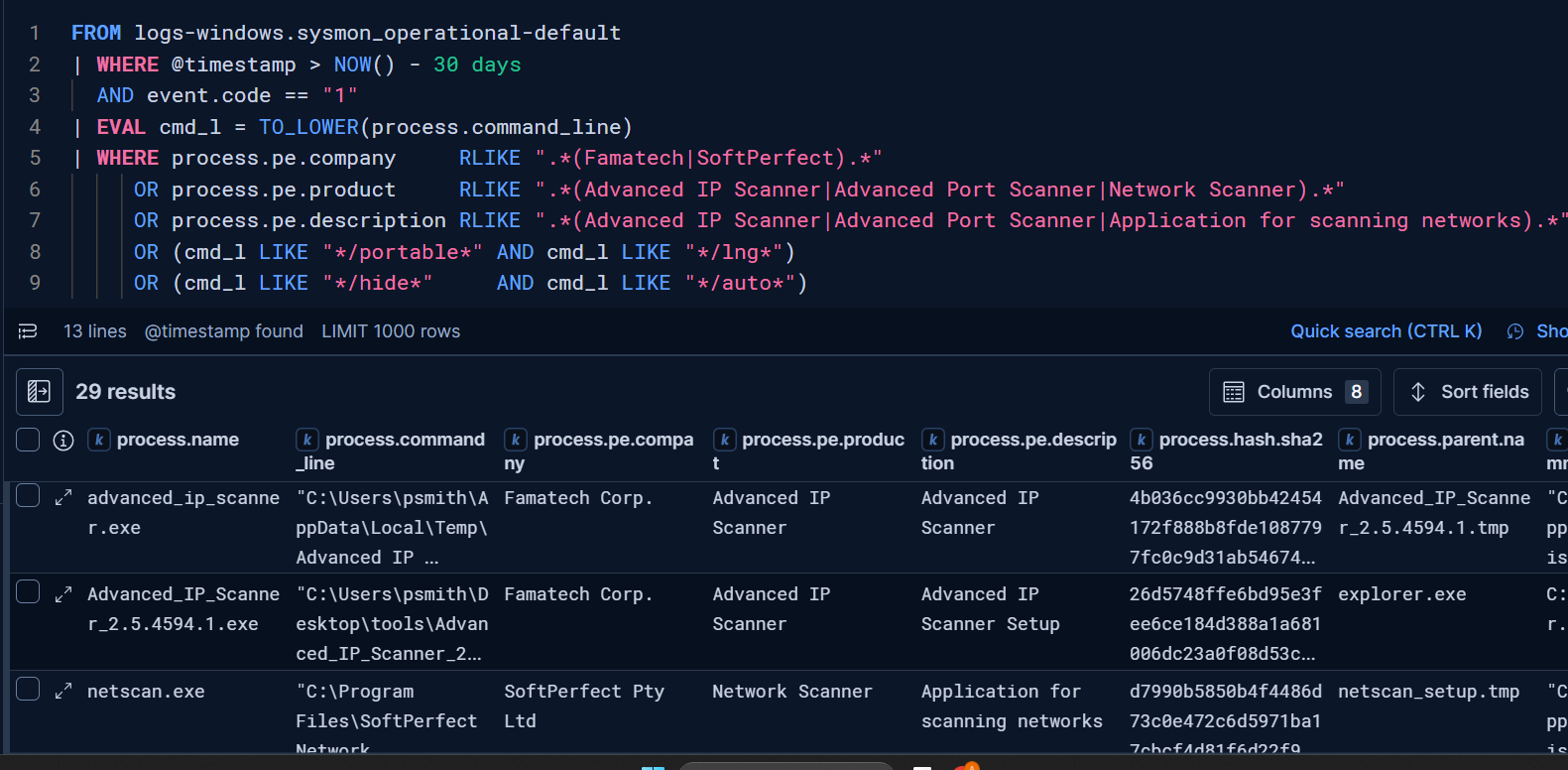
Network events
Catches: sweep behavior across all three tools via Sysmon event 3.
Tune: thresholds (default 3 IPs / 2 ports per 5-min bucket for Sysmon).
FROM logs-windows.sysmon_operational-default
| WHERE @timestamp >= "2026-04-02T03:00:00Z" AND @timestamp <= "2026-05-06T10:00:00Z"
    AND event.code == "3"
    AND process.name IS NOT NULL
    AND destination.ip IS NOT NULL
    AND CIDR_MATCH(destination.ip, "10.0.0.0/8", "172.16.0.0/12", "192.168.0.0/16")
| STATS DistinctIPs   = COUNT_DISTINCT(destination.ip),
        DistinctPorts = COUNT_DISTINCT(destination.port),
        TotalConns    = COUNT(*),
        SampleIPs     = TOP(destination.ip, 10, "asc"),
        SamplePorts   = TOP(destination.port, 10, "asc"),
        FirstSeen     = MIN(@timestamp),
        LastSeen      = MAX(@timestamp)
    BY host.name,
       process.executable,
       time_bucket = BUCKET(@timestamp, 5 minutes)
| WHERE DistinctIPs >= 3 AND DistinctPorts >= 2
| SORT DistinctIPs DESC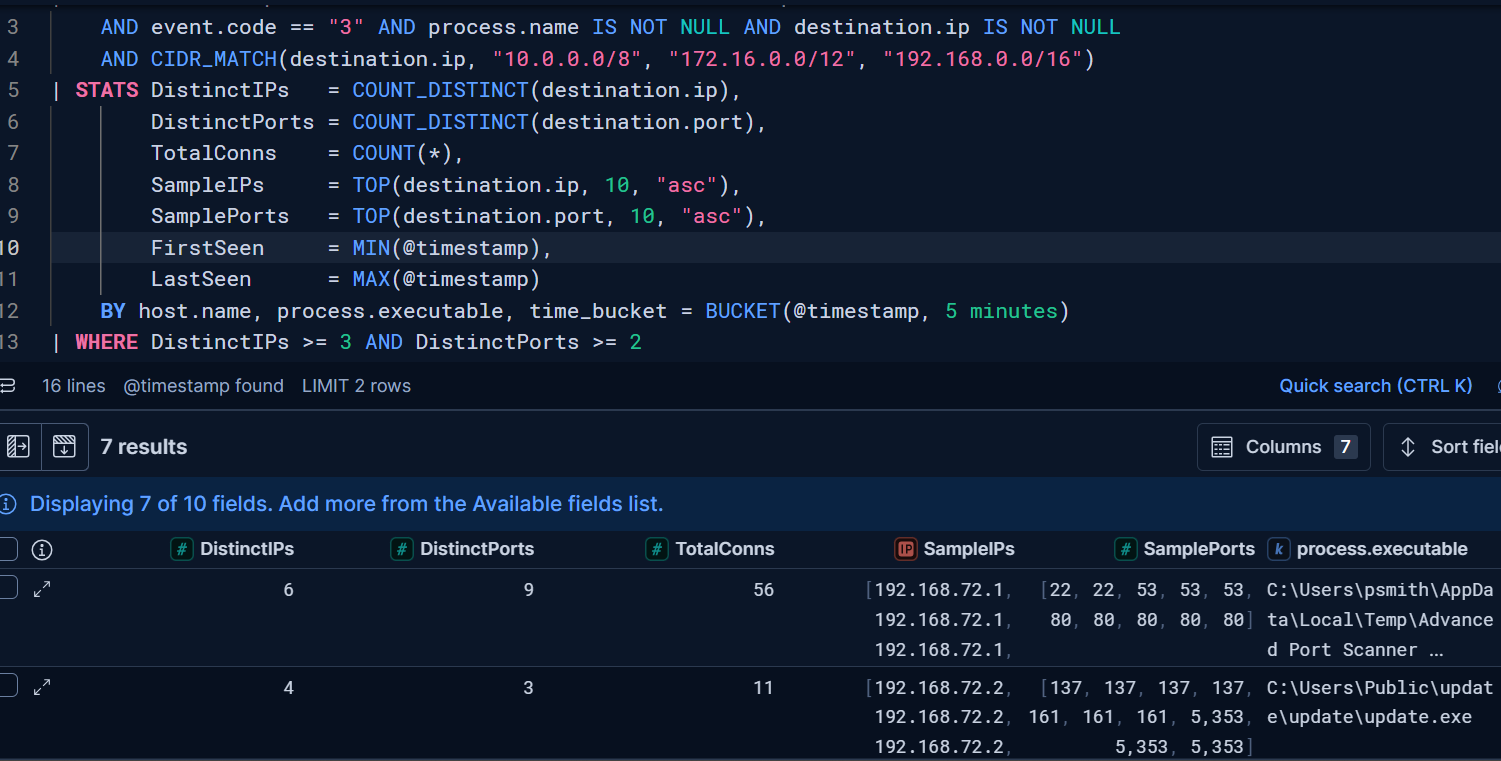
File events
Catches: AIPS and APS install footprints via Sysmon event 11.
Tune: path patterns.
FROM logs-windows.sysmon_operational-default
| WHERE @timestamp >= "2026-04-02T03:00:00Z" AND @timestamp <= "2026-05-06T10:00:00Z"
    AND event.code == "11" AND file.path IS NOT NULL
| EVAL path_lc = TO_LOWER(file.path)
| WHERE path_lc LIKE "*advanced ip scanner 2*" OR path_lc LIKE "*advanced port scanner 2*"
| EVAL Tool = CASE(
    path_lc LIKE "*advanced ip scanner 2*","Advanced IP Scanner", "Advanced Port Scanner")
| STATS FilesDropped = TOP(file.name, 20, "asc"),
        FileCount    = COUNT_DISTINCT(file.name),
        FirstDrop    = MIN(@timestamp),
        LastDrop     = MAX(@timestamp)
    BY host.name, Tool, user.name, process.executable
| SORT FirstDrop ASC
| LIMIT 500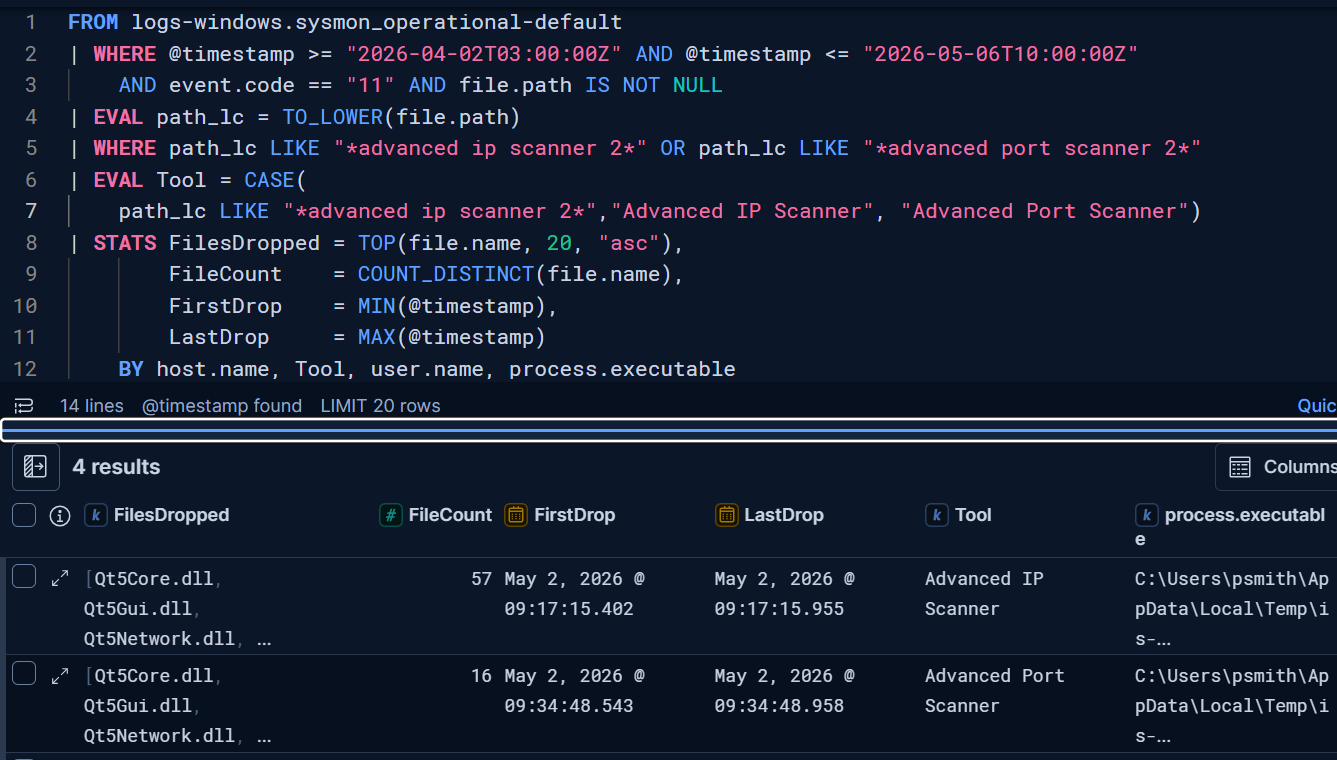
All of the above queries are also uploaded to GitHub.
Cross-reference: Sigma rules
Useful for cross-checking output, or porting to Splunk or CrowdStrike:
The queries are the first payload. The second is what the queries actually prove when they fire.
4. The signal hiding inside the detection
NetScan can run headless. Advanced IP Scanner and Advanced Port Scanner cannot. They are GUI-only.
A hit on AIPS or APS is not just a discovery alert. It is an RDP, RMM, or VDI session alert by implication. GUI tools need a desktop session. No desktop session, no GUI scan. If a GUI scanner ran on a host with no admin session active at that time, an attacker had interactive access.
Rule out admin use first. Then pivot the hunt to the same host, ±2 hours from the scanner hit:
let HitHost = "SERVER01";
let HitTime = datetime(2026-05-10T14:00:00);
DeviceProcessEvents
| where DeviceName =~ HitHost
| where Timestamp between (HitTime - 2h .. HitTime + 2h)
| where FileName in~ ("mstsc.exe", "AnyDesk.exe", "ScreenConnect.ClientService.exe", "AteraAgent.exe", "Splashtop.exe")
| project Timestamp, AccountName, FileName, ProcessCommandLine, InitiatingProcessFileName
5. Run it today
Four steps.
Run the process query over the last 30 days.
Filter out IT admin accounts and known scanning hosts (vuln scanner, asset management agent). Allowlist by hostname or account, not by tool name. Legitimate IT teams use these tools too.
For each remaining hit, check parent process and account context. If parent is
cmd.exe,powershell.exe,bitsadmin.exe, or anything launched fromC:\Users\Public\orTemp dir, escalate immediately.For AIPS or APS hits, run the Section 4 pivot. If RDP or RMM activity surfaces in the ±2h window tied to the scanner hit, scope the incident and start IR containment.
You just got a rear-view of pre-ransomware activity in your environment. Not theoretical. Tested in a lab against Sliver C2 and ready to paste into your SIEM today.
This catches three tools, not all pre-ransomware activity. RMM is the next layer, and it sits right next to discovery in every kill chain. Same format coming.
If you run the queries and find something (or find nothing), tell me on X. Reposts and likes help the next defender find this too.
Ransomware groups don’t innovate at the discovery phase. That’s the gift. Your environment doesn’t have to be number 4,114.
References
GitHub - BushidoUK/Ransomware-Tool-Matrix